

Quick view of your gym performance
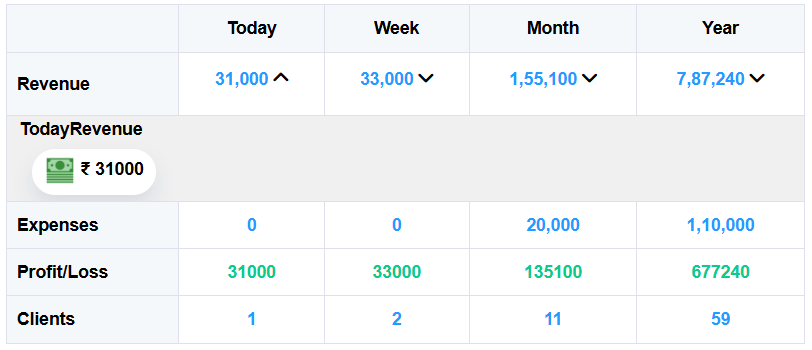
This quick view of summary gives the glimpse of gym performance Today, Week, Month and Year. It refreshes real time, and automatically displays Revenue, Expenses, Profit/Loss, and Client Count for four key periods — Today, Week, Month, and Year — so you can track your gym’s performance anytime without doing any manual calculations. This will help you control your expenses and time to act to increase revenue for a given period of time.
Moreover, you will also get the break-up of the revenue receiving by payment mode. This is really helpful as an owner to re-concile the cash, UPI, Bank, Credit Card transactions, no need to spend nights to match balances.
Where do I see this?
To view this Quick View table:
- Log in to your Apptofit account,
- From the top menu, hover on Dashboard
- Select Revenue Dashboard.
- On top of the page the very first visual you’ll see is the Revenue Summary Table.
How it is helpful?
This report helps you instantly understand how your business is performing on a daily, weekly, monthly, and yearly basis. It’s like your gym’s financial heartbeat — clearly showing how much you earned, how much you spent, and what your net profit looks like for each period.
Real Time Data Refresh
Everything in this table is automated and refreshed in no time.
Each time you record a collection or an expense, Apptofit automatically updates all the figures — no manual entry is needed. The system smartly calculates your profit or loss and the number of clients contributing to that period’s revenue.
This saves time, eliminates errors, and ensures your data is always 100% accurate and up to date.
How to Read the Table
- Revenue: Shows total income for the given time period.
- Expenses: Displays total outgoing payments recorded.
- Profit/Loss: Automatically calculated difference between revenue and expenses.
- Clients: Total number of clients whose payments contributed to that period.
You can click on the dropdown arrows beside each amount to see detailed insights such as revenue by mode of payment or daily breakdowns within that week, month, or year.
NOTE: The revenue is the actual payment received on that day, not the sale. For example Sale of yearly membership may be Rs. 10,000, but amount received today might be Rs. 5,000. Rs. 5,000 is pending balance. Learn more about pending balance here.
Real-Time Example
If your weekly revenue is ₹2,000, your monthly revenue ₹1,24,100, and yearly revenue ₹7,56,240 — Apptofit instantly reflects these updates here.
So, even if you add a new sale or record an expense, the totals refresh automatically — keeping your financial summary always current.